

Presenting the Orthodox Christian calendar in French language. The calendar includes the full calendar of feast and saints. It does not require Internet connection, and it can display both the old (Julian) and the new (Gregorian) calendar (there is a setting for the Calendar style).
Author: eir


东正教日历
I’m glad to present the Orthodox Christian calendar in Chinese language.
As with the other editions, the calendar includes the full calendar of feast and saints and it doesn’t require internet connection. It can display both the old (Julian) and the new (Gregorian) calendar.


 Get the app from Google Play!
 Use predefined SMS templates on your SmartWatch


Introducing v.2.0 of the SMS Composer for Sony’s SmartWatch. Now, you can predefine 12 SMS message templates in the app’s settings and use them from your SmartWatch.
Templates are the same as predefined messages, they are something more. Templates means that you can use codes such as %name in your predefined message, and upon sending that code will be replaced with the recipient’s name.
The codes are available in two languages, English and Russian. The full list of codes and their meanings is:%name (or %имя) – will be replaced with the full name of the contact, %given (or %и) – the given (first) name, %mid (or %п) for the middle name, %family (or %фам) – the family (last) name, %pre (%т) – name’s prefix and %suf (%суф) – name’s suffix.
It’s up to you to be creative with the templates 🙂
Following are the updated instructions for use.
Step 1.A: Write the message
——————————————————————————-Swipe RIGHT to input SPACE
Swipe LEFT to DELETE
Swipe UP to enter CAPS
Swipe DOWN to switch between keyboards.When done writing, LONG TAP the blue area to confirm the message contents.
Step 1.B: Choose from a template
———————————————————————————-
LONG TAP the “Use predefined message?”= Template list mode =
Swipe UP and DOWN to find the template you want to use.
LONG TAP the template to preview it (i.e. switch to Template preview mode)
LONG TAP the blue area on the left to directly select the template, without previewing.
Swipe LEFT to switch to Template preview mode= Template preview mode =
Swipe UP and DOWN to find the template you want to use.
LONG TAP the blue area with the text “Use this one” to select the template.
LONG TAP on the gray area with the text “Cancel” to return to Step 1.A
Swipe RIGHT to switch to Template list mode


SMS Composer for Sony SmartWatch
Upon popular demand, here’s the app which lets you compose and send SMS right from your SmartWatch!
Compose message using a T9-like keyboard. Send to an existing contact in your address book, or directly input the recipient’s number.
INSTRUCTIONS:
====================Step 1: Write the message
————————————————————————Swipe RIGHT to input SPACE
Swipe LEFT to DELETE
Swipe UP to enter CAPS
Swipe DOWN to switch between keyboards.When done writing, LONG TAP the blue area to confirm the message contents.
Step 2: Select the recipient from your contact list, or directly enter the number
———————————————————————————————————Swipe LEFT: to delete the last typed number or character
Swipe RIGHT: to delete all
Swipe UP / DOWN: to switch to T9 search
Swipe UP / DOWN: to list through the search results in T9 modeLONG TAP on the green area to confirm the selection / input.
Update of the Log for SmartWatch app

I’ve just published an update for the Log for SmartWatch app. It fixes the problem which required for people to manually trigger a screen refresh, and apart from that, adds also the relative time of call in the details screen. Was badly missed, by me at least.
So, make sure your app is up-to-date!
Speedometer / compass for Sony’s SmartWatch and Smart Wireless Headset Pro

Ever wondered how fast you were travelling, on a boat, in a bus or a taxi, or while riding your bike, but had no means at hand to find out? I often did. That’s why I felt the need of the Speedometer / Compass app for Sony’s Smart Extras – the SmartWatch and the Smart Wireless Headset Pro.
It’s an app that uses your phone’s GPS capabilities to read the current speed and direction of movement. Displayed are: the speed, clock, run-time, maximal speed reached, distance passed, phone battery status and the direction of movement.
You need to point SmartWatch / Smart Wireless Headset Pro towards the direction of movement in order to correctly read the compass indication, i.e. the green arrow that points towards North.

Speed Dial (Standalone) for SmartWatch and Smart Wireless Headset Pro
 I intended the first Speed Dial app for Sony’s Smart Extras to be extension of the Fast Dialer app, but I’ve received quite some criticism from people who – despite the clear description – were surprised that the Fast Dialer app was required for the Speed Dial to work on the SmartWatch.
Thus, here’s a standalone version of the Speed Dial app for both Sony’s SmartWatch and Smart Wireless Headset Pro that has the same functionality but no additional requirements. It makes the calls itself, and the speed dial numbers are configured in the apps preferences.
On the SmartWatch long tap on the number to initiate a call.
[youtube ijh5EOTTR-w]
Call Log for SmartWatch
 The basic functionality of browsing through the call log was not available for Sony’s SmartWatch, and it was greatly missed. Until now.
With the Log for SmartWatch application you can browse the list of calls and optionally, SMS messages, and make a call to a number from the log.
The app provides two display modes: LIST and DETAIL.

Following are the brief instructions:
SWIPE LEFT <-- TO SWITCH TO DETAIL MODE SWIPE RIGHT –> TO SWITCH BACK TO LIST MODE
In LIST MODE:
LONG TAP a log entry to view the DETAILS
LONG TAP on the SHADED RIGHT SIDE to MAKE A CALL
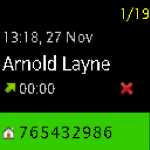
In DETAIL MODE:
LONG TAP on the X to DELETE AN ENTRY FROM THE LOG
LONG TAP on the BOTTOM GREEN AREA to MAKE A CALL
SWIPE UP / DOWN to browse the log
SWIPE LEFT <-- TO SWITCH TO DETAIL MODE SWIPE RIGHT --> TO SWITCH BACK TO LIST MODE
Russian Orthodox Calendar app for iOS
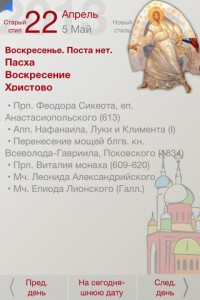 The Orthodox Calendar app is now available for free for the iPhone and iPad devices.
The app is fully in Russian, it follows the Julian Calendar, and it displays the full list of feast and saints celebrated for each day.
Also, as with the Android version of this app, it is possible to navigate through the days, both past and future, by date, or in relation to the Pascha.
Fasting rules are also displayed, but are not to be taken too literally, they are correct, but it’s better to speak to your priest rather than rely on those notes only.
Download the calendar for free from Apple’s App Store today!
https://itunes.apple.com/us/app/russkij-pravoslavnyj-kalendar/id578156705?ls=1&mt=8
The first Dialer for Sony’s SmartWatch
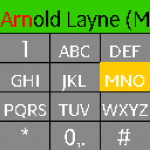
Introducing the first Dialer app for Sony’s SmartWatch. It enables direct phone dialing, as well as smart T9 search through the contacts!
The app inherits a lot from the Fast Dialer unique functionalities which have been proven to work flawlessly in the last two years, since the time the Fast Dialer app was first published.
This includes the fast T9 smart search through the contacts by name or company name, as well as the search using two alphabets at the same time. The Available alphabets are:
* Latin (all Latin-based European languages are supported)
* Cyrillic (Russian, Serbian, Ukrainian, Belorussian, Bulgarian…)
* Greek
* Hebrew
* Arabic
Following are the short instructions and a brief video demonstration.
INSTRUCTIONS:
SWIPE LEFT: to delete the last typed number or character
SWIPE RIGHT: to delete all
SWIPE UP / DOWN: to switch to T9 search
SWIPE UP / DOWN: to list through the search results in T9 mode
LONG TAP ON THE TOP GREEN BAR: to make a call
To use pauses when dialing a number:
LONG TAP ON ZERO: to enter + in numeric mode
LONG TAP ON ONE: to enter ; in numeric mode
LONG TAP ON TWO: to enter , in numeric mode